
SYNCIFY
Your Spicetify setup needs a savepoint.
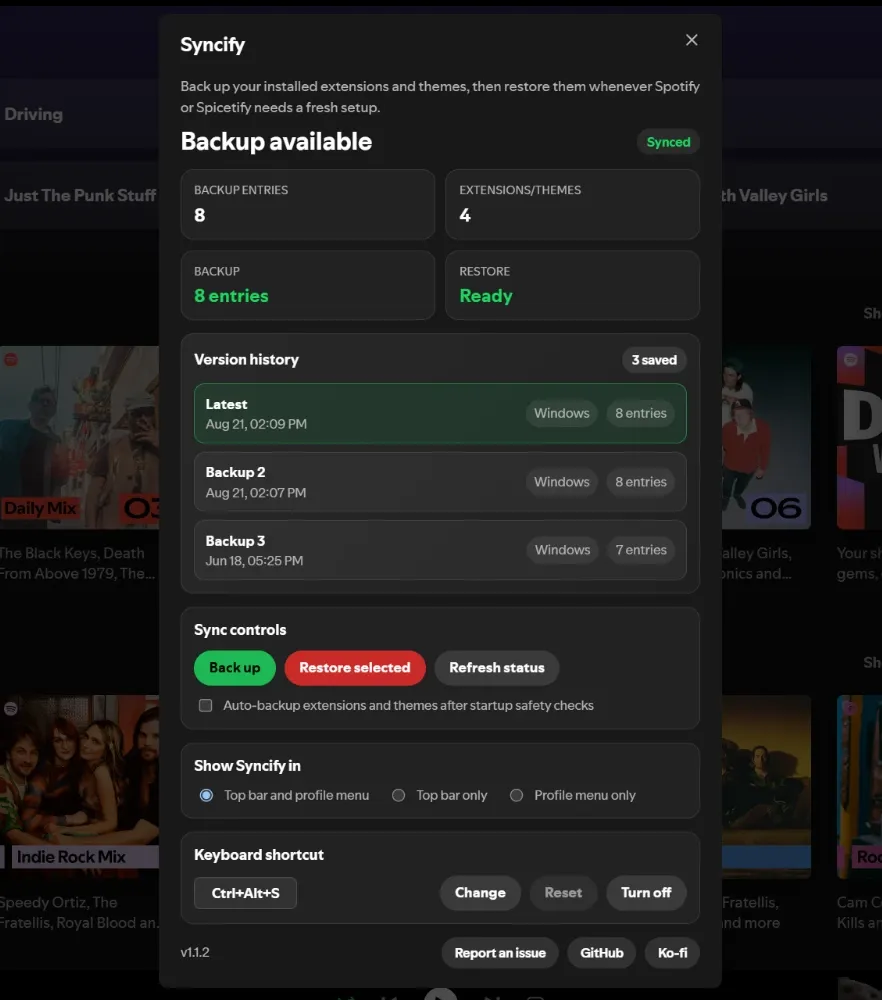
Back up the extensions, themes and snippets you added to Spotify, and get them back in one click when an update breaks them or you move to a new computer.
v1.1.2Oct 7, 2026Free and open source (MIT)
How it works
- 1Back upOpen Syncify from the top bar, your profile menu or Ctrl+Alt+S, and back up in one click.
- 2Kept onlineYour backup is saved online along with the two before it.
- 3RestoreAfter a reinstall, a broken update or on another computer, pick a backup and restore it.
- 4Back as it wasSpotify reloads, and Marketplace puts your extensions, themes and snippets back.
Concept
Syncify was planned and built on May 28, and v1.0.1 went out that night. The plan already set the rules it still follows: no account to create, your backup found through your Spotify account, and a full backup never replaced by an empty one. Automatic backups were switched off by default the same day.
v1.1.0 started keeping your last three backups instead of one, so a broken or accidental backup, or one made automatically, can't replace the only good copy. The dialog also started showing which version of Syncify you're running.
People setting up Spotify from scratch got an “empty backup” error. Marketplace had started saving its data in a different part of Spotify's storage, one that survives when Spotify resets your profile, and Syncify was still reading the old one. A Syncify user, zoltan, traced it and sent the fix, which shipped in v1.1.1.
A Spotify update made extension buttons vanish from the top bar for some people, Syncify's included. v1.1.2 puts the button back whenever Spotify redraws the bar, adds Syncify to the profile menu, and opens it from anywhere with Ctrl+Alt+S (⌘⌥S on a Mac).
Getting wiped and having to redo everything has to be exhausting.
Spicetify adds extensions and themes to the Spotify desktop app, and Spotify updates kept wiping mine. My setup is light, a few extensions for things I need and one for fun, but friends of mine run dozens of extensions and detailed themes.
On the Spicetify subreddit, lots of people had the same problem. Some said Spicetify's own local backup got wiped too, and it only runs when you remember to run it, unless you can write a script to schedule it. Syncify keeps your setup online instead, and can back it up every time Spotify starts.
How it's built
Restore: the list comes back, Spotify reloads, and Marketplace reinstalls everything.
How it's shaped
First came Spotify. Spicetify came along to add some spice to it, and Syncify came along to sync Spicetify.
People who've put time into their extensions and themes, and anyone who uses Spotify on more than one computer, since a backup made on one restores on the other.
Syncify is free and open source. A Ko-fi link in the dialog lets people chip in if it saved their setup.
Syncify is listed in the Spicetify Marketplace, so most people install it from inside Spotify. Every release also goes up on GitHub with the file attached, for people who add extensions by hand.
Questions and bug reports go through GitHub issues, and each one gets an answer with steps to narrow the problem down. When Marketplace changed where it keeps its data, a user traced the cause and sent the fix.